
PIVOT:
The pivot table allows us to display the data in a table horizontally, meaning that the information in the rows is translated into columns according to the fields we want. Specifically, while preparing the report, it allows us to make the data more understandable and regular. For example, we have an order table. Each order a customer gives is shown in one order. We would like to see the last 6 months order details for each customer. The first method may be to write down every move, but it is more understandable, and for every regular report, each customer must be on one line and the sum of all orders for the last six months must be shown in this line. In this case, we use a pivot table.
UNPIVOT:
You can use the PIVOT and UNPIVOT relational operators to change a table-valued expression into another table. PIVOTrotates a table-valued expression by turning the unique values from one column in the expression into multiple columns in the output, and runs aggregations where they’re required on any left over column values that are wanted in the final output. UNPIVOT carries out the opposite operation to PIVOT by rotating columns of a table-valued expression into column values.
SQL Pivot & Unpivot Examples
SELECT model_year,COUNT(product_name) [Number of models produced]
FROM BikeStores.production.products
GROUP BY model_year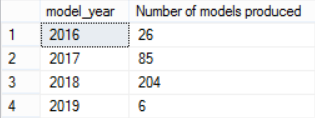
SELECT *
FROM
(
	SELECT pro.model_year FROM BikeStores.production.products as pro
) as tab

PIVOT(
	COUNT(model_year)
	FOR model_year IN ([2016],[2017],[2018],[2019])
) as piv
DECLARE @unpivot table([2016] int,[2017] int,[2018] int,[2019] int)
INSERT INTO @unpivot

SELECT *
FROM
(
	SELECT pro.model_year FROM BikeStores.production.products as pro
) as tab

PIVOT
(
	COUNT(model_year)
	FOR model_year IN ([2016],[2017],[2018],[2019])
) as piv

SELECT * FROM
(
	SELECT [2016],[2017],[2018],[2019]
	FROM @unpivot
) as tab

UNPIVOT
(
	Model_count
	FOR model_year
	IN ([2016],[2017],[2018],[2019])
) as unpiv
To access the database: click
 TrueCodes
Leave a comment